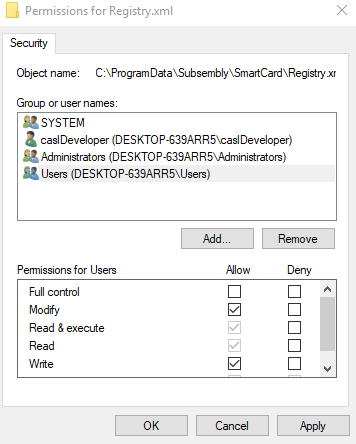
In order for PCA to automatically detect and monitor card insert and removal events, it builds a list of all of the readers that are available to the operating system. To ensure this list can be maintained by non-administrators, permissions must be granted to the file.
|
Step Number |
Procedure |
Example |
|---|---|---|
|
1 |
Go to C:\ProgramData\Subsembly\SmartCard and locate the Registry.xml file. |
|
|
2 |
Grant the Users group the Modify and Write permissions. |
|
|
3 |
Press Apply and Close. |
|