
*NOTE: This is an advanced configuration and should be used by administrative personnel only.
In environments where the workstation utilizes many readers, it is convenient to target specific readers for the credentialing process. The following instructions describe how to configure the workstation to only monitor specific card readers.
|
Step Number |
Procedure |
Example |
|---|---|---|
|
1 |
Open a command prompt as administrator. |
|
|
2 |
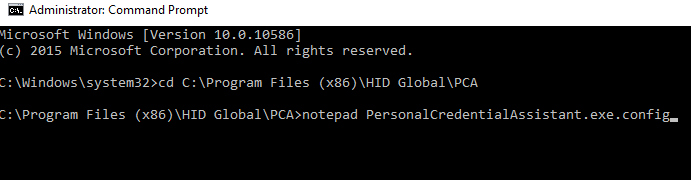
Move to the C:\Program Files (x86)\HID Global\PCA directory |
|
|
3 |
Open the PersonalCredentialAssistant.exe.config with notepad |
|
|
4 |
Within the configuration file, locate the tag of UseKioskPed |

|
|
5 |
Enter the readers PCA should use separated by the "|" symbol. The example to the right shows the configuration to have PCA only uses readers: OMNIKEY CardMan 3x21 0 and OMNIKEY CardMan 3x21 1.
Note. The "|" sign must be used in the configuration even if only configuring one reader. The example below shows this configuration: |

|
|
6 |
Save the file and restart the application. |
