To ensure the optimal printing, the printer driver settings need to be adjusted.
|
Step Number |
Procedure |
Example |
|---|---|---|
|
1 |
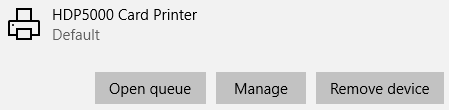
List the printing preferences for the HDP5000 Printer |
|
|
2 |
Click Manage, or right click on the HDP5000 Printer and select printer properties |
|
|
3 |
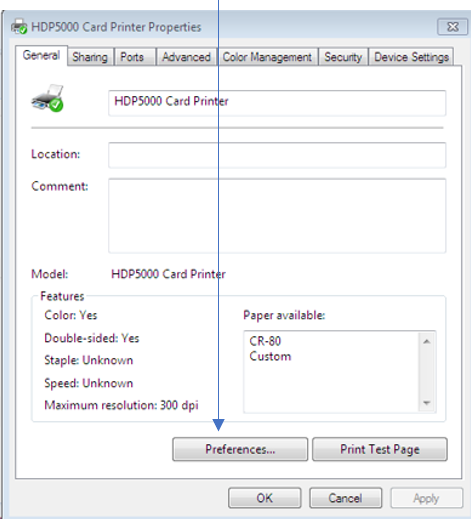
With the HD5000 Card Printer Properties configuration window open, click Preferences |
|
|
4 |
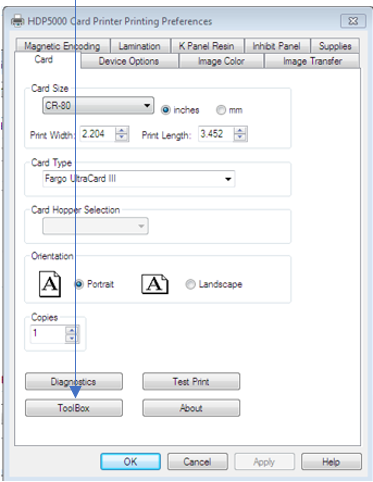
With the HDP5000 Card Printer Preferences configuration window open, click Tool Box |
|
|
5 |
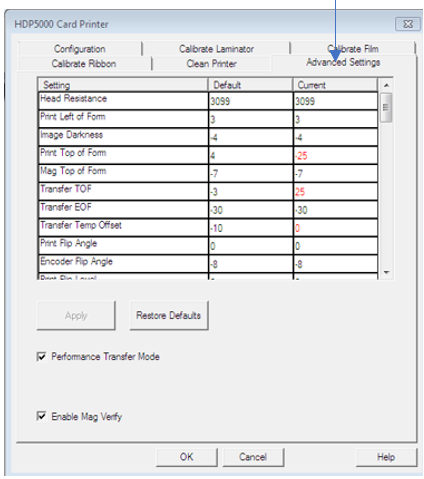
Next, click the advanced settings |
|
|
6 |
Set the Transfer Temp Offset to zero (0)
Print Top of Form (TOF) = Current Value minus 25 (i.e. change current setting by -25).
|
|
|
7 |
After all these settings have been adjusted, reboot (power cycle) the printer in order for the settings to take effect. |
|