
The Operator Credential History lists all the credentialing transactions a specific operator has performed. It lists issuance, terminate, recycle, binding, and other detailed events that as associated with device programming and credential issuance.
To Run the Credential History Report
|
Item |
Procedure |
Example |
|---|---|---|
|
1 |
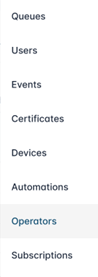
Login with the Reports Officer role and go to Reports, then Operators. |
|
|
2 |
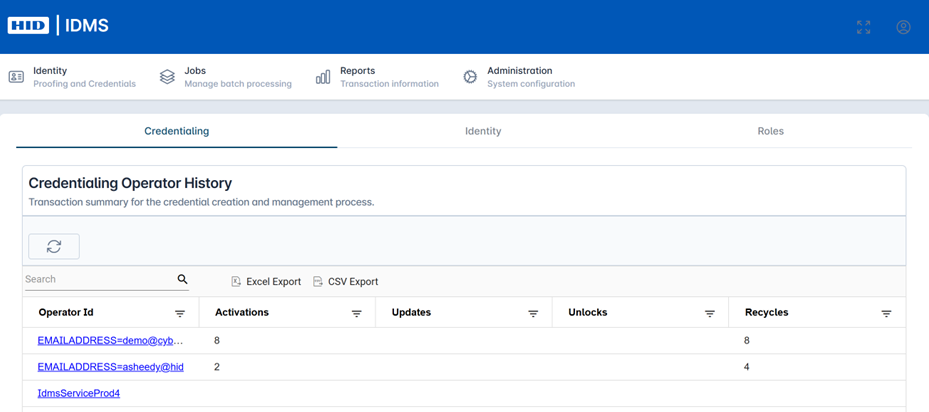
Select the Credentialing tab and then click the Refresh button to generate the report. The results are displayed in the table below. Fields include Operator Id, Activations, Unlocks, and Recycles. Use the search bar to fine-tune search or export the data using the ‘Excel Export’ or ‘CSV Export’ button. |
|
|
3 |
To view the operator details, click the operator’s User Id. |

|
|
4 |
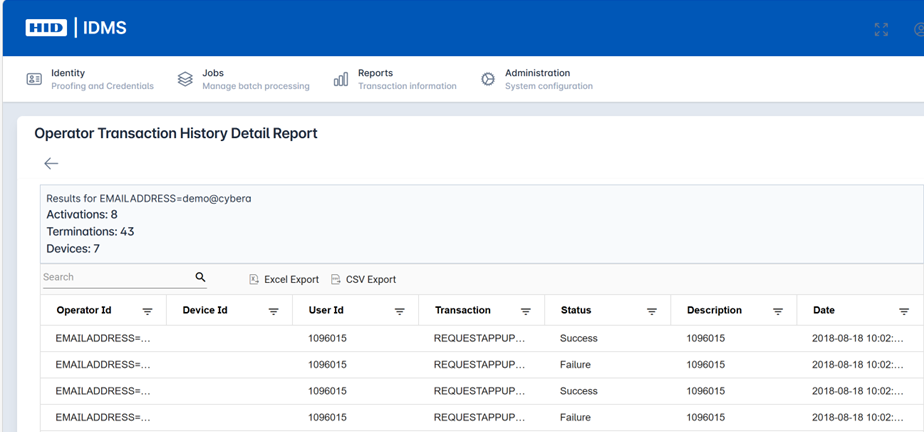
The detailed transaction history of the operator will be listed. Fields include Operator Id, Device Id, User Id, Transaction, Status, Description, and Date. Use the search bar to fine-tune search or export the data using the ‘Excel Export’ or ‘CSV Export’ button. |
|