
Obtaining the logs from the IDMS Portal
Required Permissions: SystemManager
-
Log into the IDMS
-
Click the Administration → System Connections
-
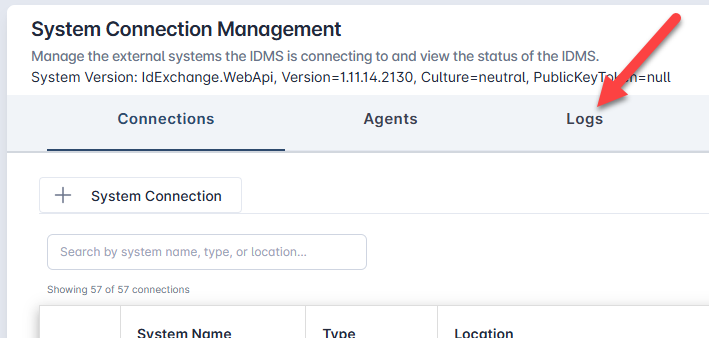
When in the System connection screen, click the logs tab
-
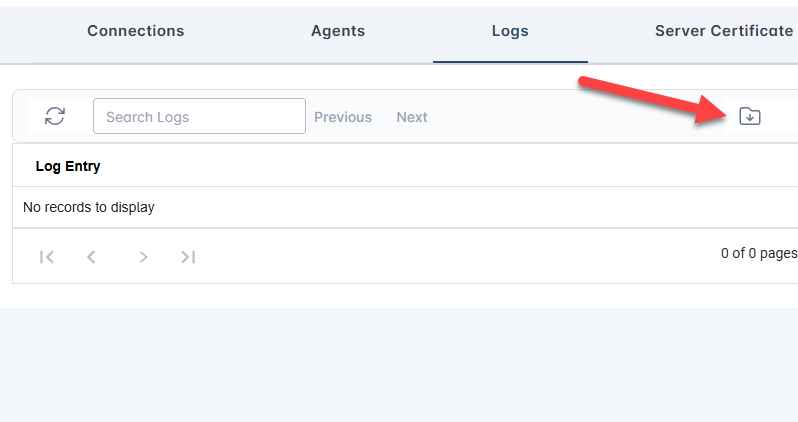
In the logs tab, click the Download logs button.
Obtaining the logs from the server
-
Go to the IDMS server
-
Go to c:\temp, rename the spi_log.txt file to spi_log.20250522.txt
-
Go to IIS, Application pools, Stop the IDMS App pool
-
Go to c:\temp, rename the idexchangeWebApi.txt file to idexchangeWebApi.20250522.txt
-
Restart the IDMS application pool
-
Create the issue where the failure occurred
-
Go to c:\temp; zip and encrypt the spi_log.txt and idexchangeWebApi.txt
-
Send the logs for review