
Preparation
In order to provided the fastest troubleshooting and resolution possible, it is important to have only logs associated with the error.
To Prepare For Log Generation
-
Stop the CMS Service
-
Go to the C:\Program Files\HID Global\Credential Management System\logs folder and back up or delete the log files currently in this folder. (The objective is to clear this folder so only new logs files are in the folder.)
Placing CMS into debug mode
For CMS Server Versions 5.10 and above when the CMS is able to start.
-
Start the CMS Service
-
Login to CMS portal
-
Click configuration
-
Click troubleshooting
-
In the CMS log management section, select DEBUG and press proceed
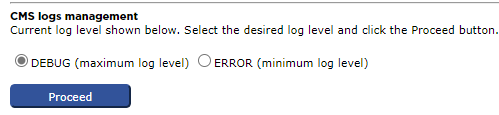
-
Preproduce the problem. Zip Encrypt the logs or send via encrypted email.
For CMS Server Versions 5.10 and above when the CMS cannot start and for CMS Servers before 5.10
-
Go to the folder C:\ProgramData\HID Global\Credential Management System\Local Files
-
Backup the existing logback.xml to a separate folder
-
Update the logback.xml by replacing the term ERROR with DEBUG
-
Save the logback.xml file
-
Restart the CMS service
-
Preproduce the problem. Zip Encrypt the logs or send via encrypted email.