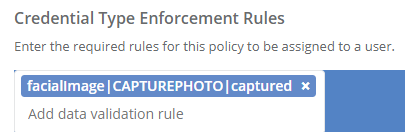
The photo of the applicant can be captured during the request creation phase. To do this, a photo capture rule needs to be specified within the credential type.
Requirements:
A credential type already exists (the existing credential type will be edited to add the photo capture configuration)
|
Step Number |
Description |
Example |
||||||
|---|---|---|---|---|---|---|---|---|
|
1 |
Authenticate as a system administrator Click Administration Click Credential Types |
|
||||||
|
2 |
Select an existing credential and press the manage button |
|
||||||
|
3 |
Within the Identity Enrollment and Proofing section, go to the "Credential Type Enforcement Rules" Create the rule with the keyword: CAPTUREPHOTO. The description is below:
In this example, IDMS will attempt to retrieve the facialimage value from the applican'ts data source. If the facial image does not equal captured or is blank, the operator will be forced to capture the photo.
|
|