
For organizations that need to enable a single operator to perform multiple roles, IDMS has a configurable setting to make it easier.
The user can turn on the streamlined application settings in addition to configuring the specific credential policy accordingly.
Configuration Steps
|
Item |
Procedure |
Example |
|---|---|---|
|
1 |
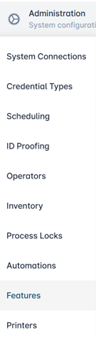
Go to Administration, then select Features. |
|
|
2 |
Use the toggle to turn on the Streamline Operator Configuration. |

|
Credential Policy Configuration
The individual credential policy must be configured with the following settings:
|
Item |
Procedure |
Example |
|---|---|---|
|
1 |
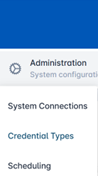
Click Administration and select Credential Types. |
|
|
2 |
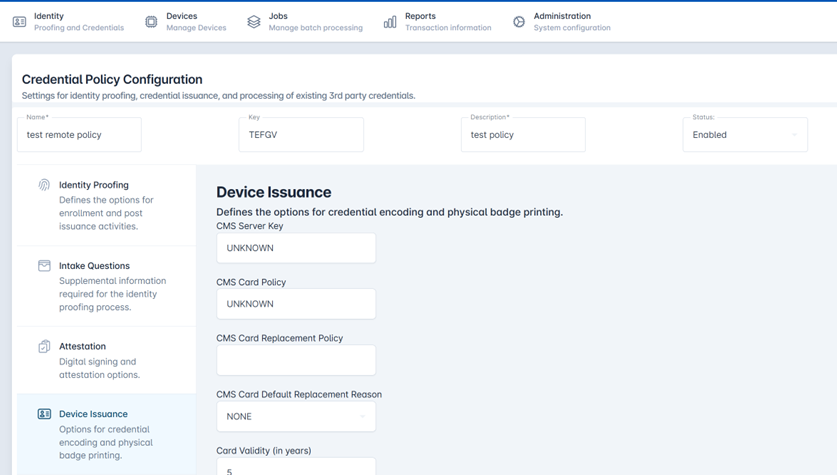
Select a Credential Policy and press the corresponding gear button. Press Configure Policy. |

|
|
3 |
Select the Device Issuance tab. |
|
|
4 |
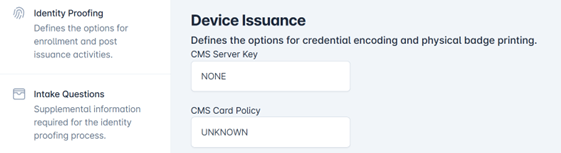
Set the CMS Server Key to NONE. |
|
|
5 |
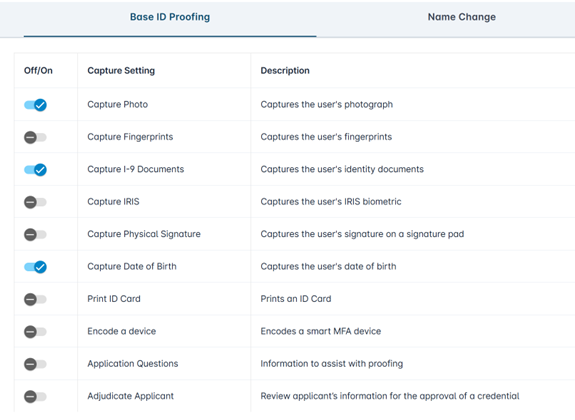
Go to the Identity Proofing tab. Under the ID Proofing Policy section, set the Adjudicate Applicant toggle to Yes. |

|
|
6 |
Under the 3rd Party Credential Enrollment section. Select the Permit Photo Upload setting to Yes. |

|