
The HID Safe platform enables enterprises to rapidly issue credentials for numerous security needs. To provide PKI encoding and life-cycle management services, SAFE can be connected to the HID CMS using the IdExchange connector modules. In order to connect these two different systems, the following database tables, windows services, and web software are used:
|
Connector Modules Descriptions |
|
|---|---|
|
1 |
CyberArmPersonView: A database table that the SAFE system stages records to. |
|
2 |
DataStar (Windows Service): A windows services that polls the CyberArmPersonView for staged records. Any new records are forwarded. |
|
3 |
IdExchange: A WebApi platform that takes incoming credential requests and routes them to the HID CMS. |
|
4 |
IdExchange MicroService (Windows Service): A windows service that receives information from the CMS and routes them to the SAFE system. |
|
5 |
CredentialInfoTable: A database table where CMS events are staged for the SAFE system. |
Architecture view
The goal of the different modules are to synchronize the SAFE and CMS systems so that the SAFE system has all of the information in one location. This allow an operator to issue the badge using the SAFE system and then be able to receive all of the subsequent events from the CMS system.
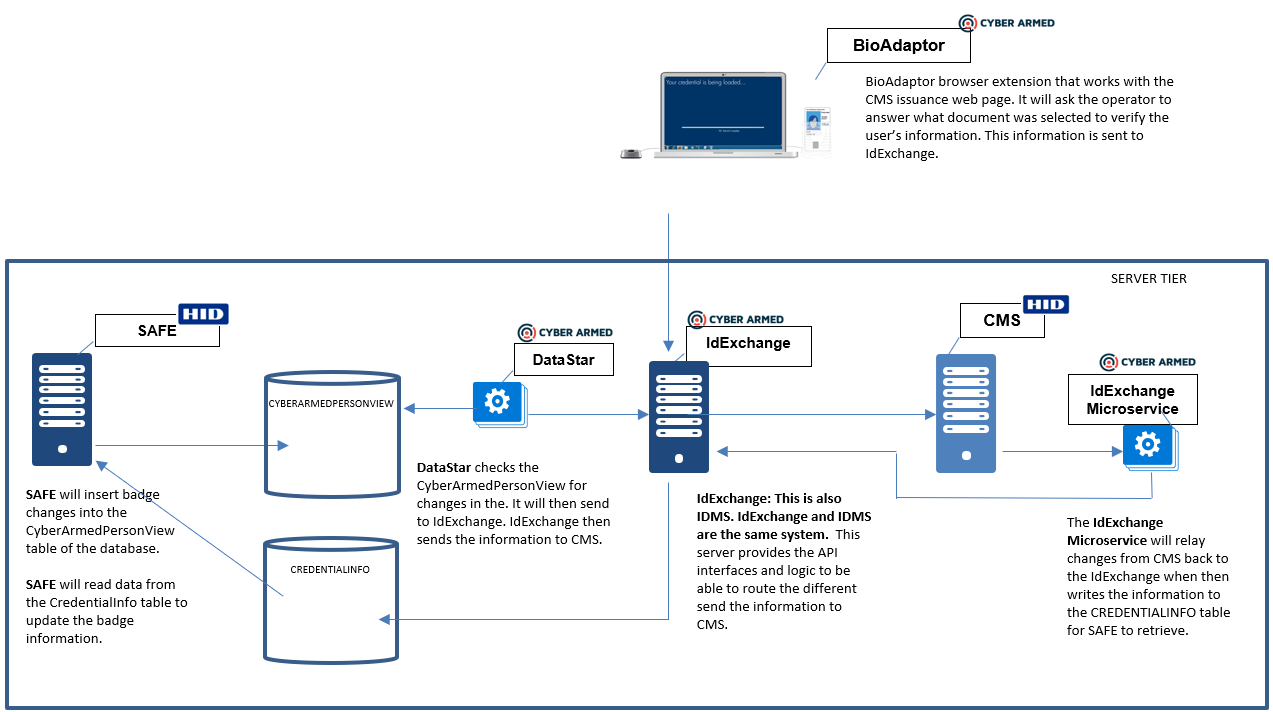
Sending Records from SAFE to CMS
-
SAFE creates an event with a new time stamp and inserts the event into the CYBERARMEDPERSONVIEW table
-
DataStar polls the CYBERARMEDPERSONVIEW for timestamp changes
-
DataStar forwards any new time stamp changes to IdExchange
-
IdExchange forwards the information to CMS
Sending CMS events to SAFE
-
A card event occurs within the CMS (activate, terminate, update) and sent to the IdExchange Microservice
-
The IdExchange Microservice forwards the information the IdExchange server which then updates the CREDENTIALINFO table
-
SAFE reads the CREDENTIALINFO table to update the card status
Badge life-cycle states
To set the life cycle of a badge the table below is used. SAFE will update the CyberArmedPerson view with this code. This code will then be sent to the CMS to manage the credential appropriately.
Certificate Lifecycle States
|
Life cycle value |
Credential State |
CMS Impact |
|---|---|---|
|
0 or 00 |
New |
PIV data is added to the CMS for a given user |
|
1 or 01 |
Resume |
If the credential is suspended in CMS, the credential will be resumed. |
|
2 or 02 |
Suspend |
If the credential is active in CMS, the credential will be suspended. |
|
3 or 03 |
Terminate |
If the credential is active or suspended in CMS, the credential will be permanently terminated. |
Card/Device Lifecycle States
|
Life cycle value |
Device State |
CMS Impact |
|---|---|---|
|
0 |
Suspended |
The device has been suspended |
|
3 |
Terminated |
CMS Terminated a device |
|
4 |
Bound |
A device has been bound to a user |
|
5 |
Failed |
The device failed to be activated |
|
6 |
Cancelled |
The request to activate the credential was cancelled |
Sending custom FASCN information
To specify a custom system code, credential number or person identifier value, SAFE can append these values to the UPN data field in CyberArmedPersonView. An example of is below:
|
UPN |
Agency Code |
System Code |
Credential Number |
Person Identifier |
CS |
ICI |
Card Expiration Date |
Cert Lifetime in days |
|---|---|---|---|---|---|---|---|---|
|
8899 |
8902 |
001002 |
1900001152 |
0 |
0 |
12-25-2028 |
365 |
Shutdown and Restart Dependencies
The DataStar, IdExchange WebApi, and CMS should be considered a singular unit and should be shutdown in a specific sequence in order to minimize data loss.
|
DataStar, IdExchange WebApi and CMS shutdown sequence: |
|
|---|---|
|
1 |
DataStar: Shutting this system down will stop the processing of synchronizing the SAFE system with the CMS system. SAFE will still be able to stage records to be synchronized, but these records will not be forwarded until the DataStar service is restarted. |
|
2 |
IdExchange (the IIS Web Application): This system should be shutdown after the DataStar service has been shutdown. If the IdExchange system is shutdown before DataStar, DataStar will encounter errors because it will not be able to complete its message forwarding transaction. |
|
3 |
CMS: The CMS should be shutdown after the IdExchange (the web application) has been shutdown. If CMS is shutdown before IdExchange (the web application), IdExchange will fail to route identity information to the CMS. |
IdExchange Service (Windows Service): It is recommended the IdExchange Windows service being running at all times. This service listens to events from the CMS and inserts these records directly into to the CredentialInfo table. If the CMS or IdExchange is not running, the IdExchange Windows Service will remain idle.