
The CMS CyberArmed CA Gateway enables the CMS to forward certificate requests to the IdExchange Microservice. This capability is useful when there are certificate authorities not directly reachable the CMS
To install the CMS CyberArmed CA Gateway
-
Stop the CMS Service
-
Copy the IdExchange.Ca.Plugin.jar to the C:\Program Files\HID Global\Credential Management System\cms_portal\WEB-INF\lib folder
-
Go to the C:\ProgramData\HID Global\Credential Management System\Shared Files folder and and backup the credProviders.properties file.
-
Edit the credProviders.properties file. Go to the top of the file and enter the following: credential.providers=sample
credential.provider.sample.description=CyberArmed CA Gateway
credential.provider.sample.class=com.hidglobal.ia.cms.samples.credprov.SampleCredentialProvider. When complete, the file will be: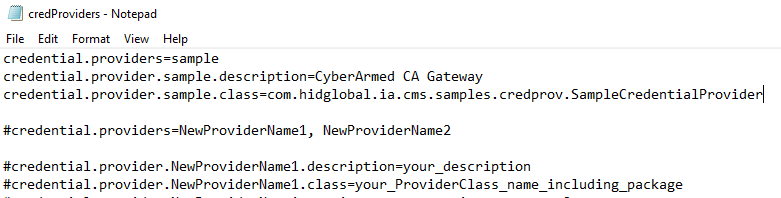
-
Save the file
-
Restart CMS