
The procedure below will enable an Administrator to download the IDMS operator list and their respective roles. The list can then be uploaded to a different IDMS.
Prerequisites
-
System Manager role permission required Role Definitions
Access Master Operator Report and Roles
Download the operator role report.
|
Item |
Procedure |
Example |
|---|---|---|
|
1 |
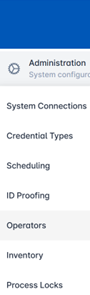
Authenticate to the IDMS as a System Administrator. Click Administration, then click Operators.
|
|
|
2 |
Click the Download Operator List button. |
|
|
3 |
A file called “ImdsOperators.txt” will be downloaded. This file can be uploaded to a different IDMS to insert the operators. Important: The file is encrypted and is not readable. Important: The file is encrypted and is not readable. |
|