
To upgrade the IDMS.Core HSM MicroService
-
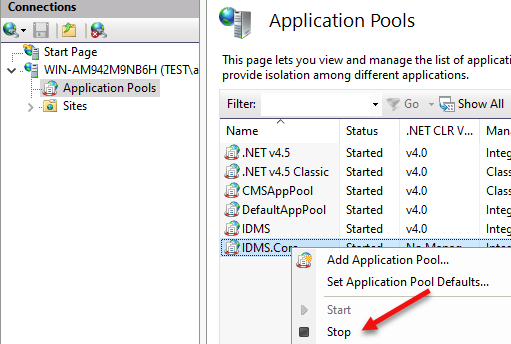
Open IIS Manager, click application pools and stop the IDMS.Core Application Pool.
-
C:\Program Files\CyberArmed\IDMS.Core and backup the existing publish folder.
-
Go to the IDMS distribution package and go to the IDMS Client\HSM folder. Copy the publish directory from this package to C:\Program Files\CyberArmed\IDMS.Core
-
Go to IIS Manager, click application pools and start the IDMS.Core Application pool.
-
Once the IDMS.Core application is running, perform a basic connection test by going the browser and going to https://DNS_NAME:454

-
Go to the IDMS, system connections, and verify the HSM connection.