
IDMS provides a connection to WebQueue Service, retrieving user information to support a REST API use case for flexibility and customization.
Prerequisites
-
System Administration user permissions are required Role Definitions
Configuration Steps for WebQueue and REST API Support
|
Item |
Procedure |
Example |
|---|---|---|
|
1 |
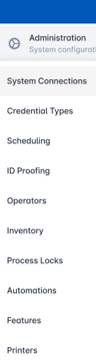
Login as with system administrator permissions. Click Administration then select System Connections. |
|
|
2 |
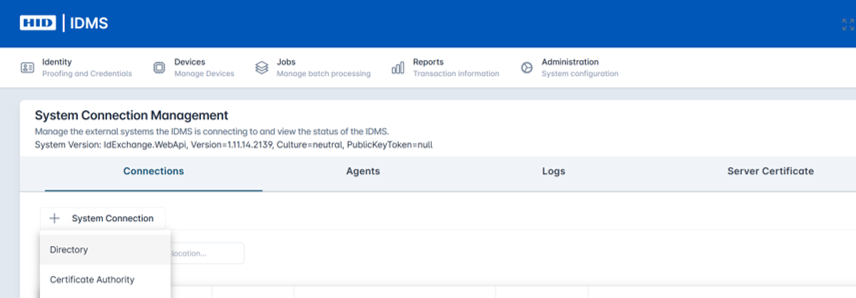
Click the + System Connection button and then select Directory from the drop down. |
|
|
3 |
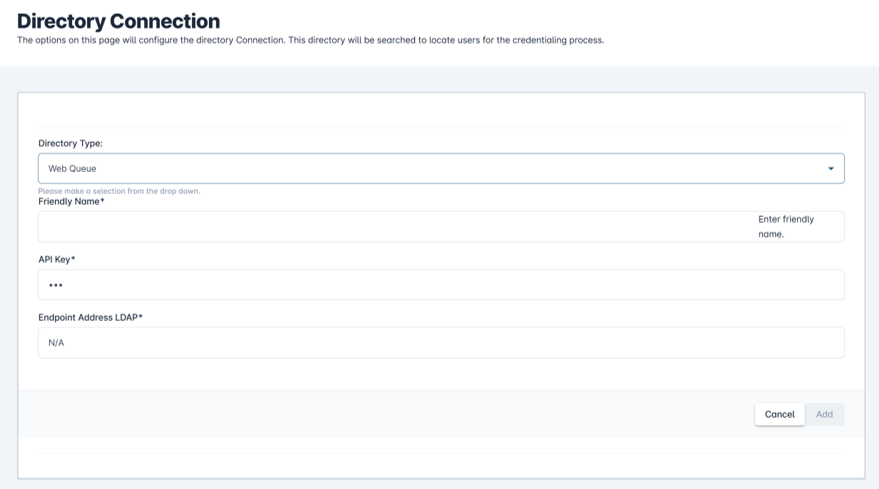
In the Directory Type field, select WebQueue as the Directory Type: |
|
|
4 |
Then complete the remaining fields:
|
|
|
5 |
Press Add to save the WebQueue connection. |
|
|
6 |
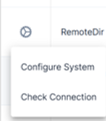
Then you can test the system connection. Go to the gear button next to the listed WebQueue connection and then select Check Connection. You will see an update under the Health Check field showing status and timestamp of last check. |
|
Extending the timeout
WebQueue calls now wait up to 5 minutes (300 seconds) for a response by default, instead of 100 seconds, which fixes uploads being reported as failed ("A task was canceled") when WebQueue had actually completed them. The timeout can be changed with an optional Web.config setting, and if the setting is missing or invalid, the 300-second default applies, so no configuration change is needed unless you want a different value.
Steps to change the timeout
-
On the IdExchange WebApi server, open the Web.config file in the site's root folder (the IIS physical path for the IdExchange WebApi site).
-
Make a backup copy of Web.config before editing it.
-
Find the <appSettings> section and add this line inside it, replacing 600 with the number of seconds you want (1 to 1800):
<add key="WebQueueTimeoutSeconds" value="600" />
-
Save the file. IIS restarts the application automatically when Web.config is saved, which briefly interrupts any requests in progress, so do this during a low-activity period.
-
To confirm the new value is in use, run a WebQueue upload and check the IdExchange log (DEBUG level) for the line making call to WebQueue.... timeout is 600 seconds.
Notes
-
Values above 1800 are capped at 1800 seconds. Values that aren't a number, or are 0 or less, fall back to 300 seconds. In both cases a warning is written to the log.
-
To go back to the default, remove the line and save the file.