
To connect to the IDMS.Core HSM MicroService
-
Click Administration → System Connections
-
Press + System Connection
-
Select Hardware Security Module
-
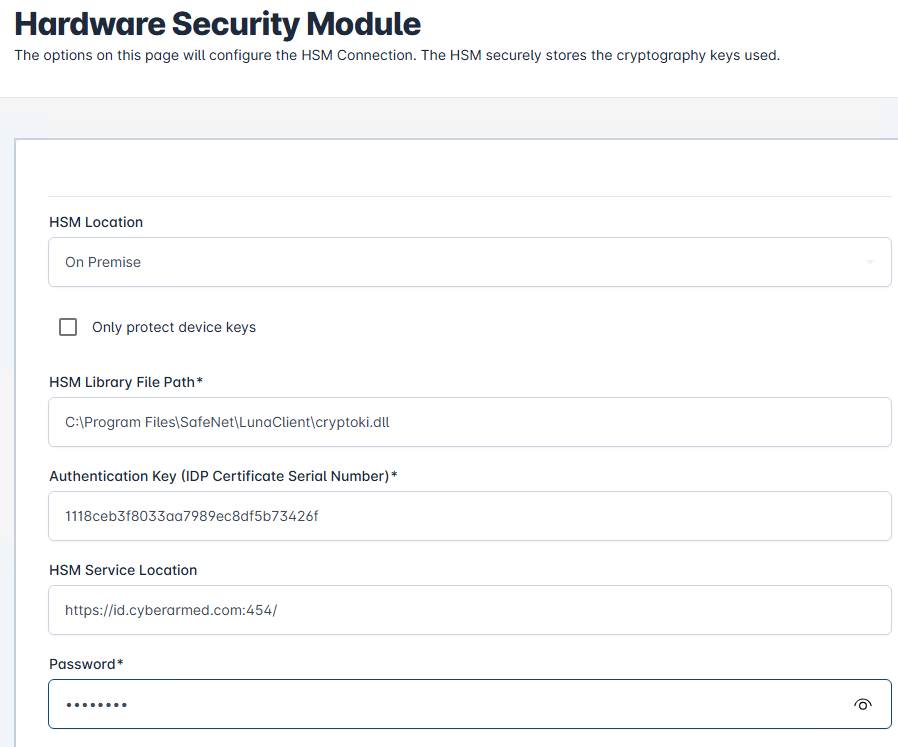
HSM Location: Select On Premise
-
Authentication Key: Enter the certificate serial number of the certificate the IDMS will use to contact the IDMS.Core MicroService
-
HSM Library Path: Enter the path to the HSM Vendor’s PKCS library. For Luna: C:\Program Files\SafeNet\LunaClient\cryptoki.dll. For Thales, C:\Program Files (x86)\nCipher\nfast\toolkits\pkcs11\cknfast-64.dll
-
HSM Service Location: Enter the address of the IDMS.Core service:
-
Password: Enter the PIN to the HSM.
-
Press Add
-
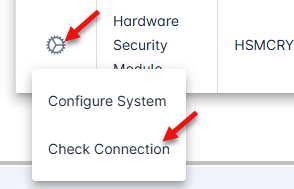
Once the system is added, press the gear icon and select Check Connection
-
When successful, the HSM response will return an encrypted value.

-
To troubleshoot, go to the c:\temp folder and review the idexchangeWebApiCore.txt and idexchangeWbApi.txt logs to determine the failure.