
Authentication to the CMS system requires a digital certificate. The process creating a CMS operator requires that the operator’s certificate be registered with the CMS.
Before getting started
Obtain the certificate that the operator will use to authenticate to the CMS
Required Permissions
CMS Administrator Permissions
To add a CMS Operator
-
Obtain the .cer certificate that the operator will use to access the CMS
-
Log in to the CMS Application
-
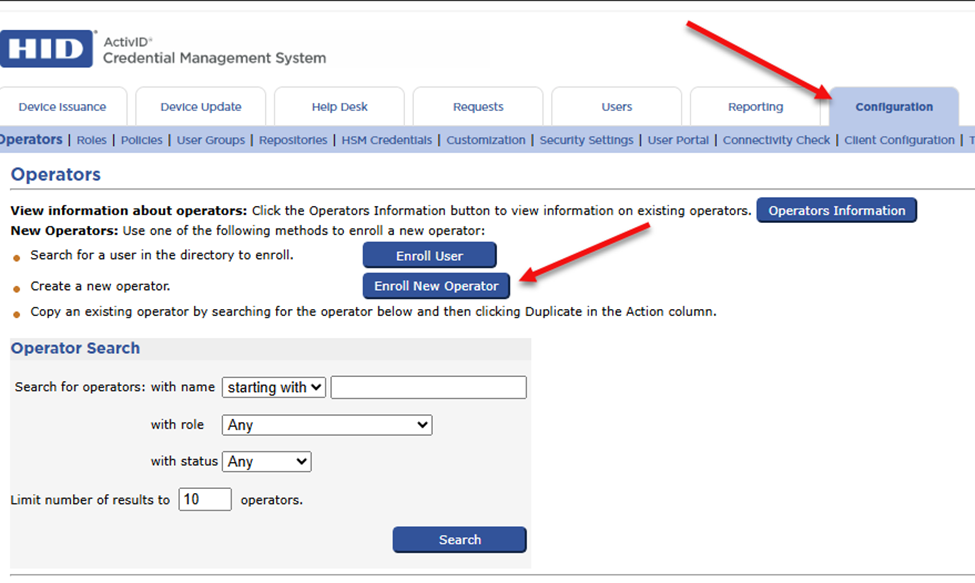
Click configuration to load the Operators Screen, Click Enroll New Operator
-
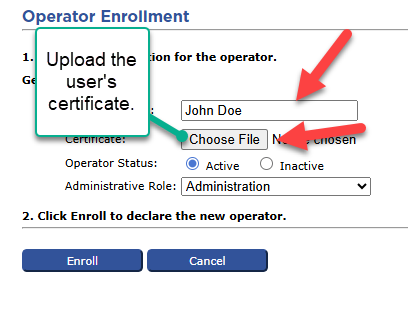
Enter the Operator Name, click Choose File and upload the user’s certificate.
-
Select the Role
-
Press Enroll.