
This guide provides step-by-step instructions to verify that the HID Global and PivIT extensions are enabled in both Microsoft Edge and Google Chrome browsers.
Step-by-Step User Guide
Part 1: Verify Extensions in Microsoft Edge
-
Open Microsoft Edge:
-
Locate and click the Microsoft Edge icon on your computer's desktop or in your Start menu to launch the browser.
-
-
Access Extensions:
-
Look for the Extensions icon (it often looks like a puzzle piece 🧩) on the right side of the browser's address bar.
-
Click this Extensions icon.
-
-
Go to Manage Extensions:
-
In the small menu that appears, click on "Manage extensions." This action will open a new tab in your browser, showing a list of all installed extensions.
-
-
Check Extension Status:
-
On the "Extensions" page, find the extensions named "HID Global" and "PivIT".
-
Next to each of these extensions, ensure that the toggle switch is in the "On" (blue) position.
-
If a switch is gray, click it to enable the extension.
-
Part 2: Verify Extensions in Google Chrome
-
Open Google Chrome:
-
Locate and click the Google Chrome icon on your computer's desktop or in your Start menu to launch the browser.
-
-
Access Extensions:
-
Look for the Extensions icon (it often looks like a puzzle piece 🧩) on the right side of the browser's address bar.
-
Click this Extensions icon.
-
-
Check Extension Status:
-
In the small menu that appears, you will see a list of your installed extensions.
-
Find the extensions named "HID Global" and "PivIT".
-
Ensure that the toggle switch next to each of these extensions is in the "On" (blue) position.
-
If a switch is gray, click it to enable the extension.
-
Part 3: Verify IDMS can access the Extension
-
Insert a smart card or device that contains a certificate
-
Log into the IDMS
-
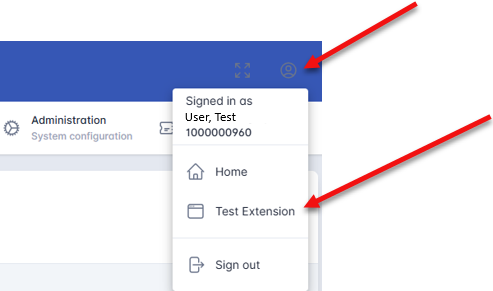
In the top right corner of the IDMS page, click the circular icon. Next press Test Extension
-
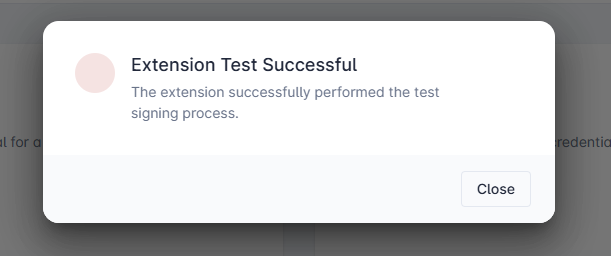
A successful test will indicate display the following.
Checklist: Verify Browser Extensions
Use this checklist to ensure all necessary extensions are enabled.
Microsoft Edge
-
[ ] Open Microsoft Edge.
-
[ ] Click the Extensions icon (🧩).
-
[ ] Click "Manage extensions."
-
[ ] Verify "HID Global " is enabled (toggle switch is blue).
-
[ ] Verify "PivIT" is enabled (toggle switch is blue).
Google Chrome
-
[ ] Open Google Chrome.
-
[ ] Click the Extensions icon (🧩).
-
[ ] Verify "HID Global " is enabled (toggle switch is blue).
-
[ ] Verify "PivIT" is enabled (toggle switch is blue).