
The IDMS logs can be automatically sent to a SIEM platform. The instructions below describe the steps to configure the IDMS for SIEM log routing.
|
Item |
Procedure |
Example |
|---|---|---|
|
1 |
Stop the IDMS. |
|
|
2 |
Go to the IDMS installation folder and locate the web.config file. |

|
|
3 |
Backup the web.config file. |
|
|
4 |
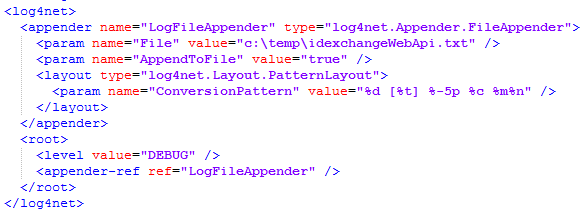
Open the web.config with a text editor. Locate the <log4net> section. |
|
|
5 |
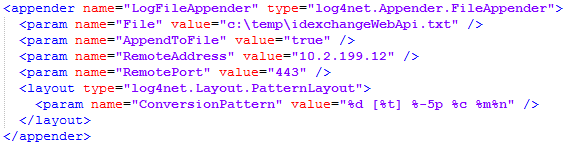
Under the tag <param name="AppendToFile" value="true" />, add the following two tags:
where SIEM.Server.Ip is the IP address of the SIEM Server and SIEM.Server.Port is the port number for the SIEM server.
|
|
|
6 |
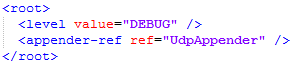
Update the <appender-ref ref="LogFileAppender" /> tag to
|
|
|
7 |
Save the web.config. |
|
|
8 |
Restart the IDMS. |
|
|
9 |
View the SIEM platform to verify the logs are being written. |
|