The HID Derived Credential CA Interface provides configuration details to the IDMS to enable the IDMS to call the CMS API to create a derived credential request for a mobile application. This system provides the mapping for the CMS mobile application policy to be used in the derived credential request.
To set up the HID Derived Credential CA Interface
-
Go to Administration → System Connections
-
Click Add System Connection
-
In the dropdown, select Certificate Authority
-
Click the Certificate Authority Type drop down and select HID Derived
-
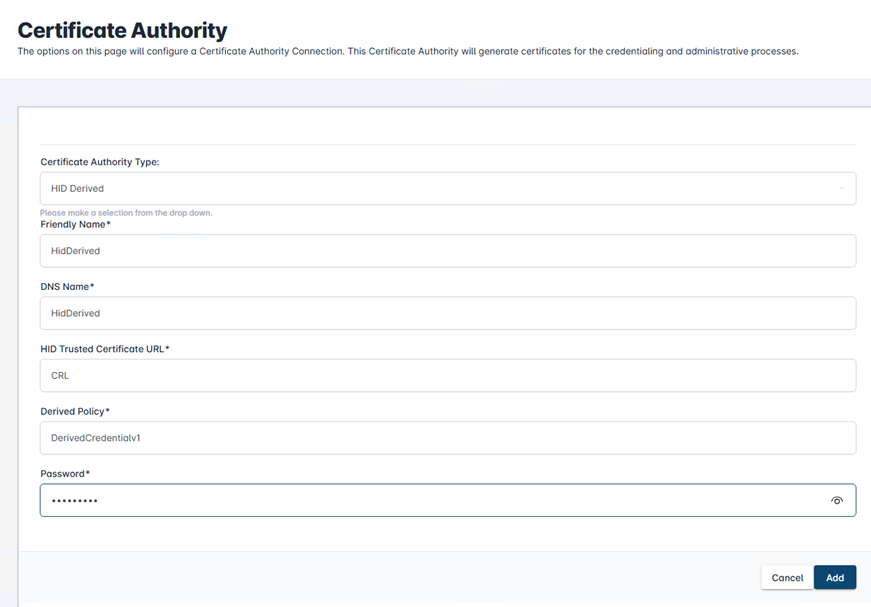
In the Friendly name field, enter “HIDDerived”
-
In the DNS field, enter “HIDDerived”
-
In the HID Trust Certificate URL, type “CMS”
-
In the Derived Policy, Enter the CMS policy specify for the mobile applications
-
In the password field, enter “hidglobal”. *Note, this password is not used for authentication. It is a placeholder.
An example of the configuration is:
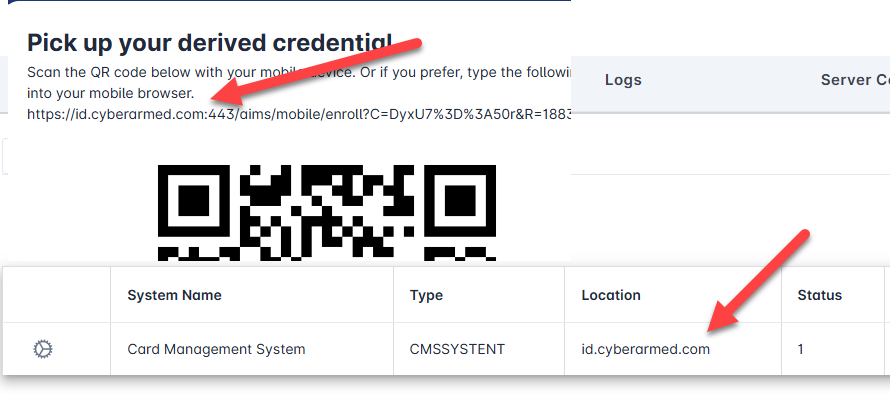
Setting DNS Name in the HID Derived Credential QR Code
The DNS Name in the QR Code is read from the CMS connection information. To adjust, the update the IdExchange.ChannelConfiguration, DNSName for the CMS System.