The IDMS can connect to a certificate authority to perform processes to manage users, retrieve certificate details and to issue certificates. The instructions below provide the details for configuring the certificate authority.
|
Step Number |
Procedure |
Example |
|---|---|---|
|
1 |
Log in with system administrator privileges and click the System Connections Tab |
|
|
2 |
Click Add Certificate Authority Connection |
|
|
3 |
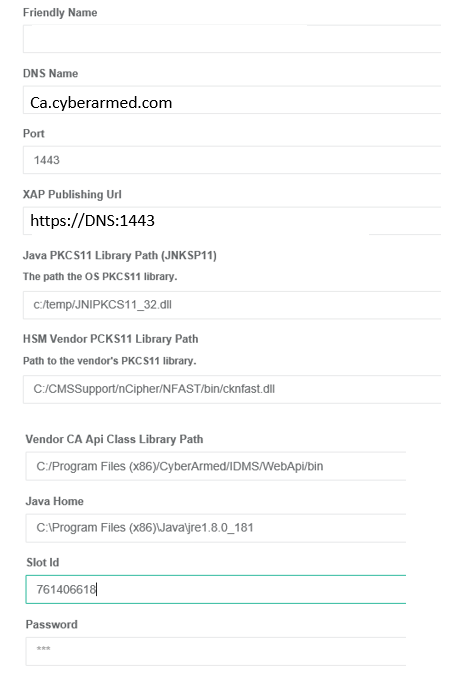
Add the following configurations: Friendly Name: This is the easy to remember name for the CA system DNS Name: The DNS address of the CA Port: The XAP port number the CA is using CA Publishing URL: For CAs that offer certificate services via URL, enter the URL for the CA certificate endpoint OS PKCS11 Library Path: The path to the JNI PKCS 11 library Vendor PKCS11 Library Path: The path to the vendor specific PKCS11 library. Vendor CA Api Class Library Path : The path to the CyberArmed Entrust java Interop directory Java Home: The path to the Java home. Note that the User environment variable must also be set Slot ID: The slot ID the credential is located in Password: The PIN to the slot ID |
|
|
4 |
Press "Add System" |
|