
In the event a user’s corporate data is updated after the user has been been enrolled and approved (for example, an email change), their IDMS and CMS data can be updated using the Refresh Org Info Option. When the Refresh Org Info selection is made, the IDMS user attributes and CMS PIV Meta data is updated with the latest information from the user’s corporate directory.
The user’s state must be APPROVED, not ISSUED. If the user has an issued credential, their data cannot be refreshed.
Prerequisites
-
Required Permissions: ApprovalOfficer
-
Additionally, the Org Refresh option has been enabled.
To Update the User’s Corporate Data
|
Item |
Procedure |
Example |
|---|---|---|
|
1 |
Go to Manage and search for the user. |
|
|
2 |
Locate the user and click the Manage button |
|
|
3 |
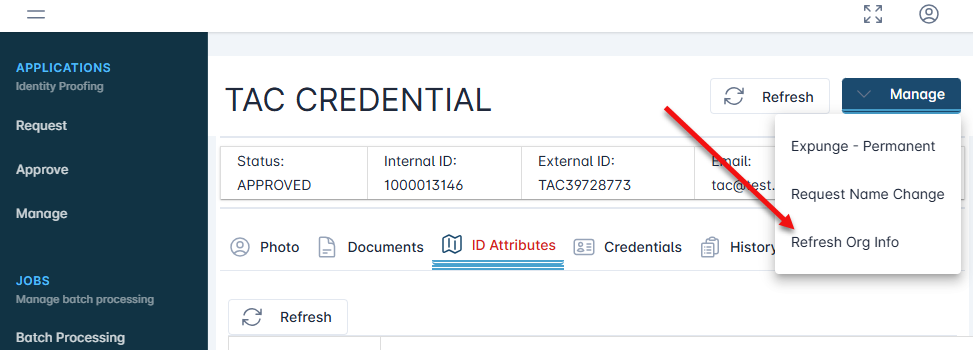
Click the Manage button and select Refresh Org Info |
|
|
4 |
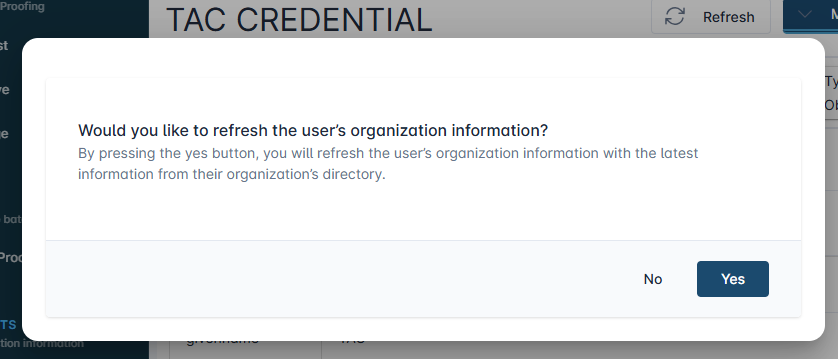
When prompted, press the Yes button to continue with the data refresh. |
|
|
5 |
The user’s IDMS record will be updated with the latest directory information. |
|