Requirements:
The account the IDMS server is running as must be able to access the Microsoft CA.
The Scep templates exist in Microsoft CA. Click here for instructions Certificate template for Derived PIV Authentication
Adding CA connection to IDMS
|
|
|
|
|---|---|---|
|
1 |
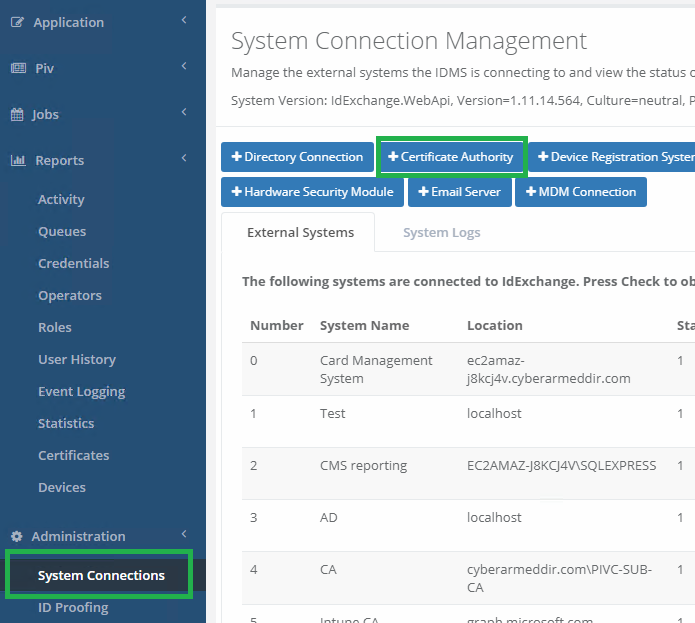
Log in to IDMS and add Certificate Authority under System Connections |
|
|
2 |
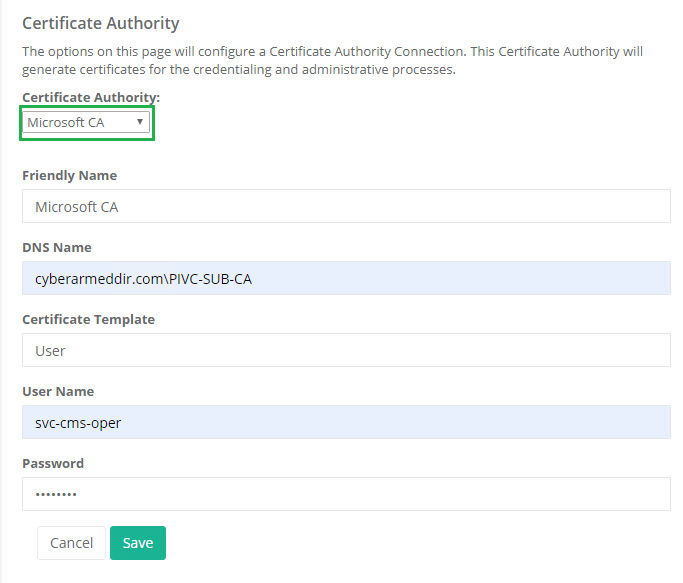
Certificate Authority : Microsoft CA Friendly Name : Choose any DNS Name : domain name\name of the CA Certificate Template : name of the certificate template that will be requested User Name: user that has access to the CA Password: password for the user that has access to the CA |
Note: The CA DNS Name can be: IPAddress\CA-Name 192.168.110.1\CyberArmedCa LocalSystem can be used. The Application pool does not be mapped to a specific user name.
|
|
3 |
After the CA has been created press "Check" Expected result : List of available certificate templates. |
|